Testimonials
A page of your site where your buyers, clients and visitors leave a testimonial, like a guestbook. You read each one before choosing to publish it, and you can answer it.
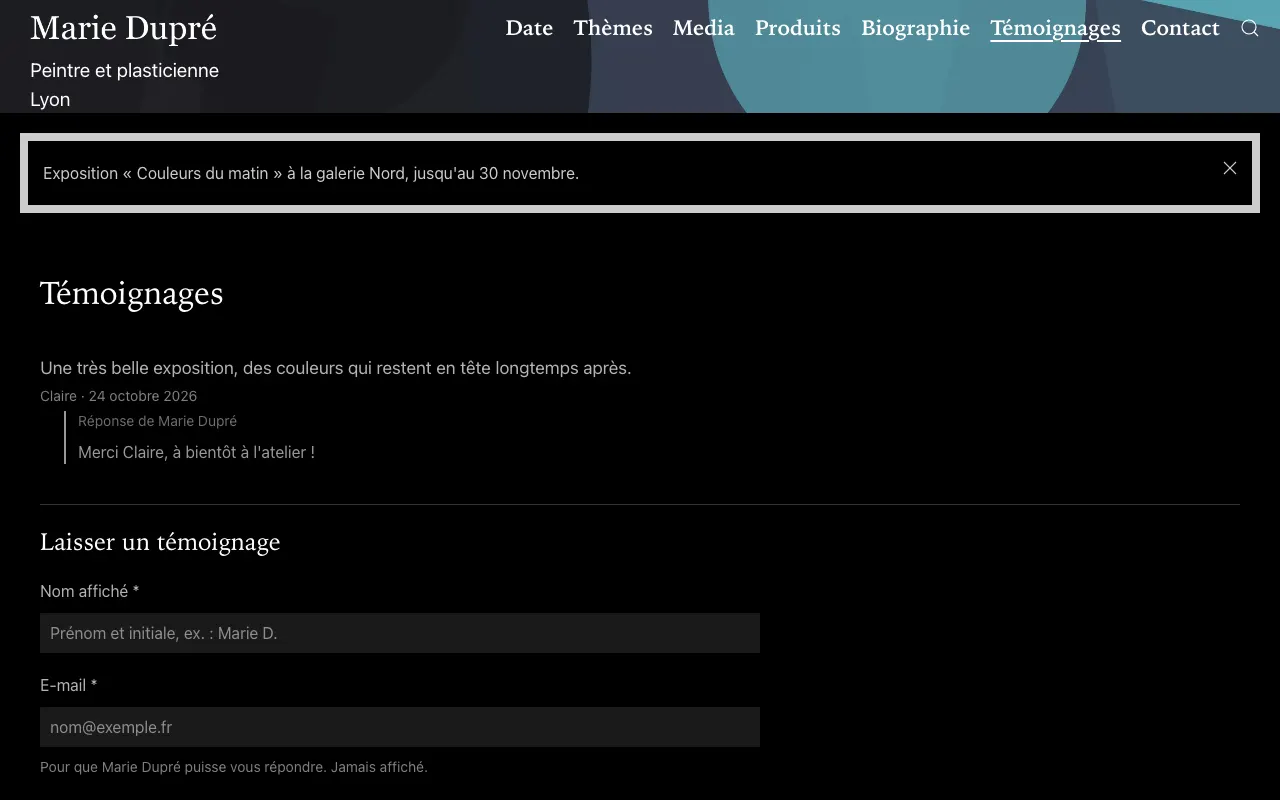
The page
The page is on by default, at /testimonials (/avis on a site in French, /testimonios in Spanish). It shows the published testimonials, newest first, with their date and your reply, then the form: name shown, e-mail (never shown) and the testimonial, with the visitor's agreement to its publication. The menu has a Testimonials entry as soon as one is published.
Its settings are in the Testimonials page panel of your site's settings (Edit my site):
- Testimonials
- on by default; turn it off and save if you don't want the page;
- Testimonials: name in the menu
- the page's title and menu entry, for example “Guestbook” or “Reviews” (empty: “Testimonials”, in the site's language);
- Testimonials: introduction
- an optional text at the top of the page (a welcome, what you would like to hear about);
- Testimonials: e-mail
- where you are told about each new testimonial (empty: the shop's contact e-mail, otherwise your account's). Never shown on the site.
Share the link and its QR code
The Testimonials box, on the right of your site's settings, shows the page's link with Copy the link, and its QR code to download (Download (PNG) or Download (SVG)) and print on cards, in parcels, at concerts and exhibitions.
Read, answer, publish
- Each new testimonial arrives as a draft, and you receive an e-mail with a link to it.
- In Content Manager, Testimonials, open it. You can fill in Your reply: it shows under the testimonial.
- Save, then Publish to show it on your site, or Delete entry (the ⋯ menu) if you don't want it. Unpublish takes it down again.
The people you invite to your site can read, answer and publish testimonials, but don't see the authors' e-mail addresses.
Verified purchases
If you sell in your shop, each order can have its testimonial marked Verified purchase on the page:
- after paying, the buyer's thank-you page invites them to leave a testimonial once the order has arrived;
- in Orders, each order has a Testimonial box with its own link, Copy the link and Send by e-mail (a ready-made message from your own e-mail program), and whether it was received or published;
- or let Tilefolio e-mail each buyer for you: turn on Testimonials: e-mail to buyers, and set Testimonials: delay of this e-mail (3 to 60 days after payment, 14 by default), the time for the parcel to arrive. Each buyer gets it once, in your name, and their replies come to you. It isn't sent to buyers who already wrote one, nor for orders paid more than 30 days before: turning it on doesn't write to all your past buyers.
Only one testimonial per order, and nobody can mark a testimonial as verified by hand.